How to Block or Limit Discord on Chrome
Last updated:
Quick answer
Chrome has no built-in website blocker or per-site time limit. Install SiteKeeper, add discord.com, and set a daily limit of 0 hours and 0 minutes to block Discord, or 30 minutes to cap it.
Without an extension, Family Link on a supervised account, Chrome's URLBlocklist policy, the hosts file, or router and DNS filtering can block Discord. None of them is a daily minute budget in ordinary Chrome.
Limit or block Discord with SiteKeeper
SiteKeeper sets that budget in desktop Chrome. It is privacy-first; we never sell or share your data. It is a Chrome extension only: limits and history do not sync, and there is no phone app. The Discord desktop app is a separate program, covered below.
Set a daily limit, for example 30 minutes
Do this from the popup on the Discord tab in Chrome.
1Install SiteKeeper in Chrome
Install SiteKeeper from the Chrome Web Store. The toolbar badge then shows today's minutes for the hostname in the active tab.
2Open the popup on discord.com
Open Discord in Chrome and click the SiteKeeper icon. The popup shows today's time on this tab's hostname and a Set Limit button. The web app is
discord.com, with no www.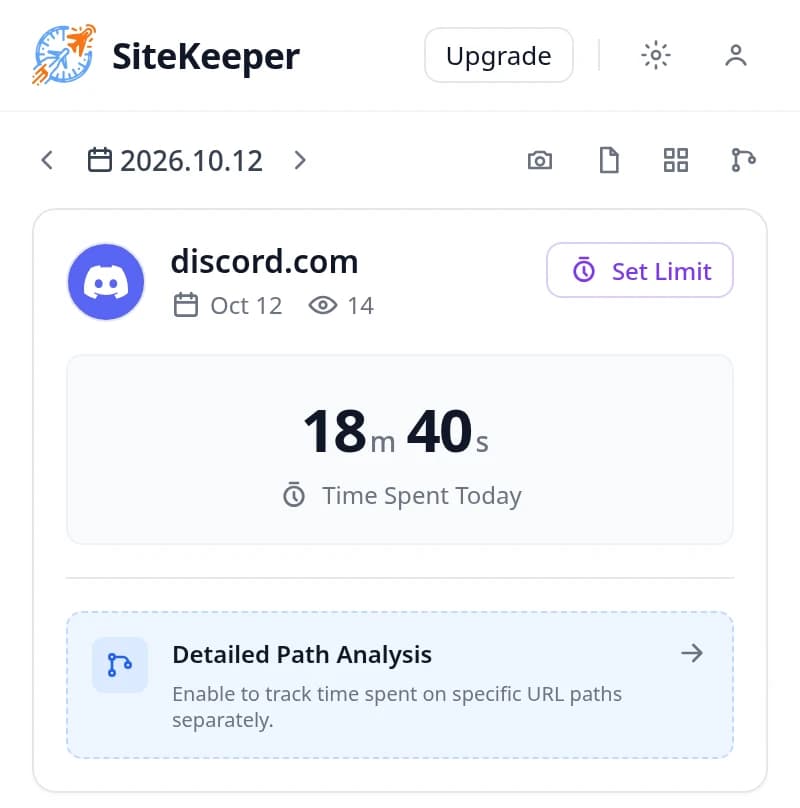
The popup on discord.com shows today's time on this hostname and Set Limit. The minutes in this picture are demo data. 3Turn on Limit Web Time and set 30 minutes
Click Set Limit and turn Limit Web Time on. Set 0 hours and 30 minutes, or choose the 30m preset. That is a 30-minute daily cap. The other daily presets are 10m, 1h, 2h, and 3h. Hours run from 0 to 23 and minutes from 0 to 59.
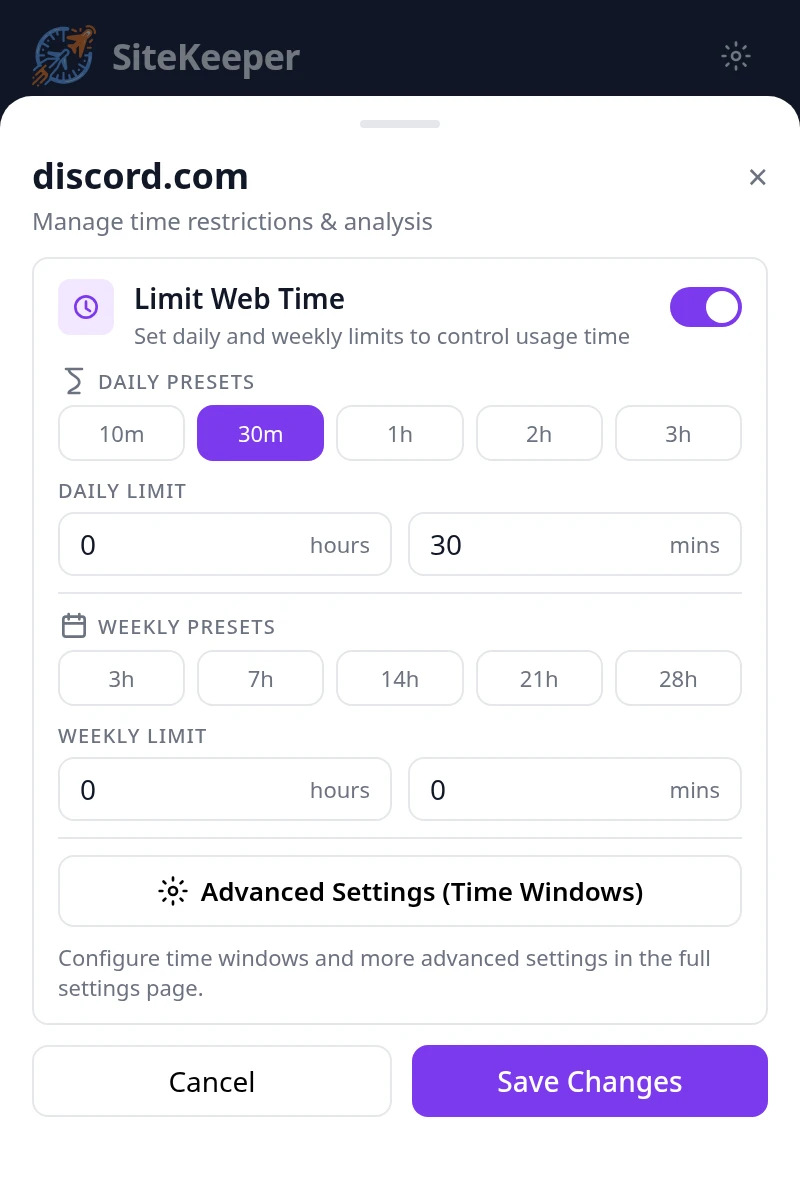
Limit Web Time is on for discord.com, with the 30-minute daily preset. 4Click Save Changes
Click Save Changes. The popup saves the limit for this tab's hostname. If you add Discord from Settings, Limited Sites, Add Site, Enter Custom Website, type
discord.com. Do not addwww. A normal visit never stays onwww.discord.com.When today's time on that hostname reaches the limit, the active tab and later top-level visits open the block page. The counter resets at local midnight.
Block Discord completely with a 0-minute limit
There is no separate always-block list. A daily limit of 0 hours and 0 minutes is the block.
1Turn Limit Web Time on for discord.com
Use the same popup on the hostname it shows. Turning Limit Web Time off removes the limit and leaves Discord open.
2Leave the daily fields at 0 and 0
Leave both daily fields at 0, with no preset selected, and click Save Changes. With the switch on and both fields at 0, the daily budget is zero seconds.
3Open Discord once
The block starts after one visit, because 0 seconds already meets a 0-second limit. That first load can show Discord for about a second, then redirect. Later visits, including the next day, open the block page immediately.
Add a weekly limit
A weekly limit is optional and free, on the same screen as the daily limit. Hours run from 0 to 168, plus minutes. Presets are 3h, 7h, 14h, 21h, and 28h. The week is Monday through Sunday. The host blocks when that week's time hits the cap, even if today is under the daily limit. One hostname is one of six free sites whether you set daily, weekly, or both. Pro removes the cap.
Block Discord during work hours
Open Advanced Settings (Time Windows) from the popup. That opens the full settings page for this site. Pick Workdays, Weekends, or All, then a start and an end on the same day. A window cannot cross midnight, so 9:00 PM to 1:00 AM is two windows.
A window limit counts only time inside that window. Set it to 0 hours and 0 minutes to block Discord for the whole window, such as Monday to Friday, 9:00 AM to 5:00 PM. Outside the window, the daily and weekly limits still apply. A window with no limit of its own does not block by itself.
What you see when time runs out
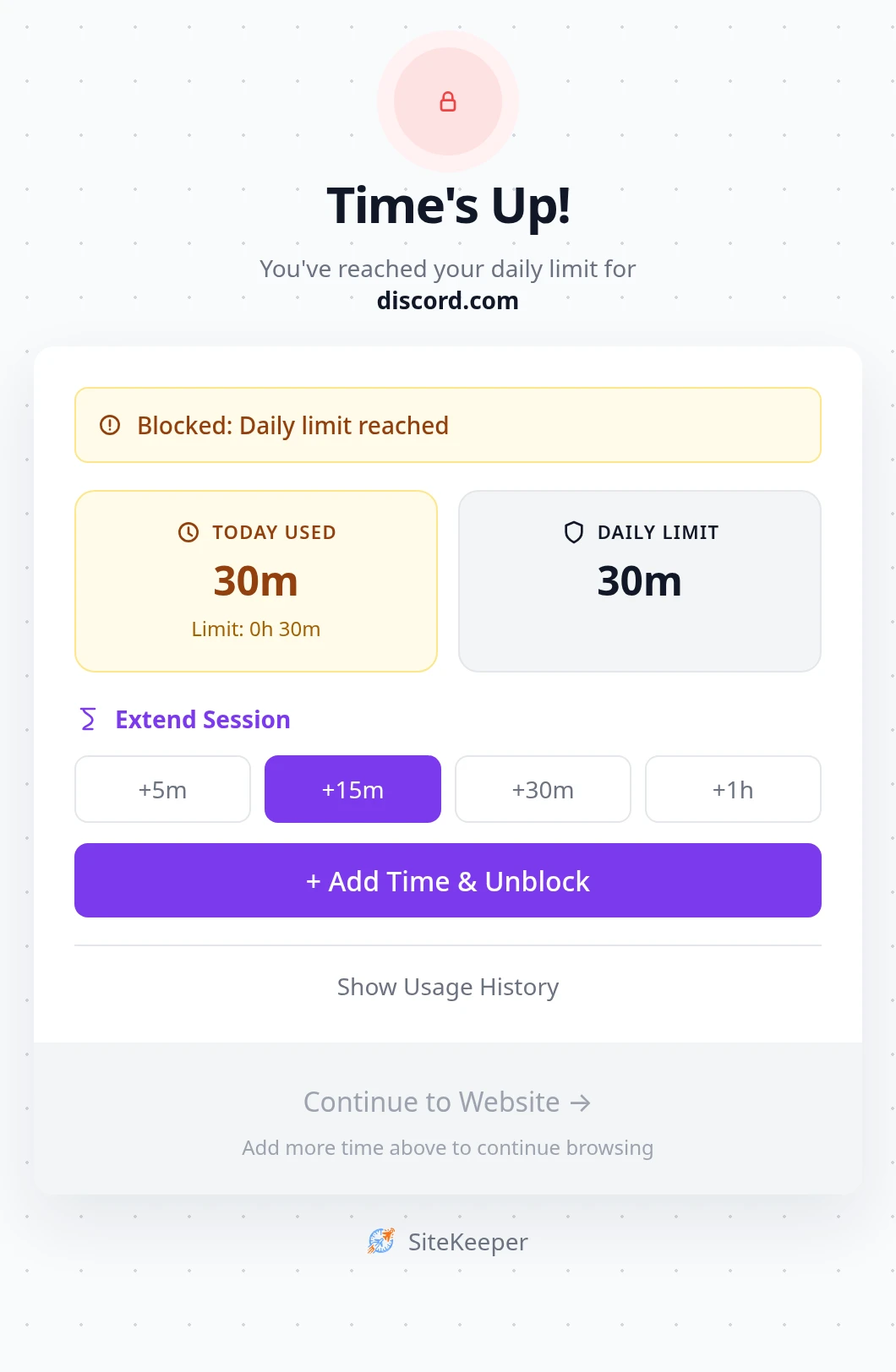
The page is titled Time's Up!. It names the hostname and the reason (daily, weekly, or time window) and shows time used against the limit, including weekly numbers when a weekly limit is set. Extend Session is +5m, +15m, +30m, and +1h. Add Time & Unblock adds that amount to the saved limit that was exceeded. A 30-minute cap plus 15 minutes stays 45 until you lower it. That is a soft limit, not a snooze.
Continue to Website stays disabled until the cap is no longer exceeded. Show Usage History is 7 days. You can turn the limit off or disable the extension. There is no password. For a child, or if you will click +15m, use Family Link, Chrome policy, the hosts file, or DNS below.
Discord hostnames, servers, and the desktop app
Each limit matches one exact hostname.
The web app is discord.com
www.discord.com, discordapp.com, and discord.gg redirect to discord.com. After that redirect, the discord.com row is the one that records time and blocks. A row saved as discord.gg or www.discord.com never matches, because the browser does not stay there. Invite links follow the same redirect, then share the discord.com clock, including /app and /channels/....
Canary and PTB are extra hostnames
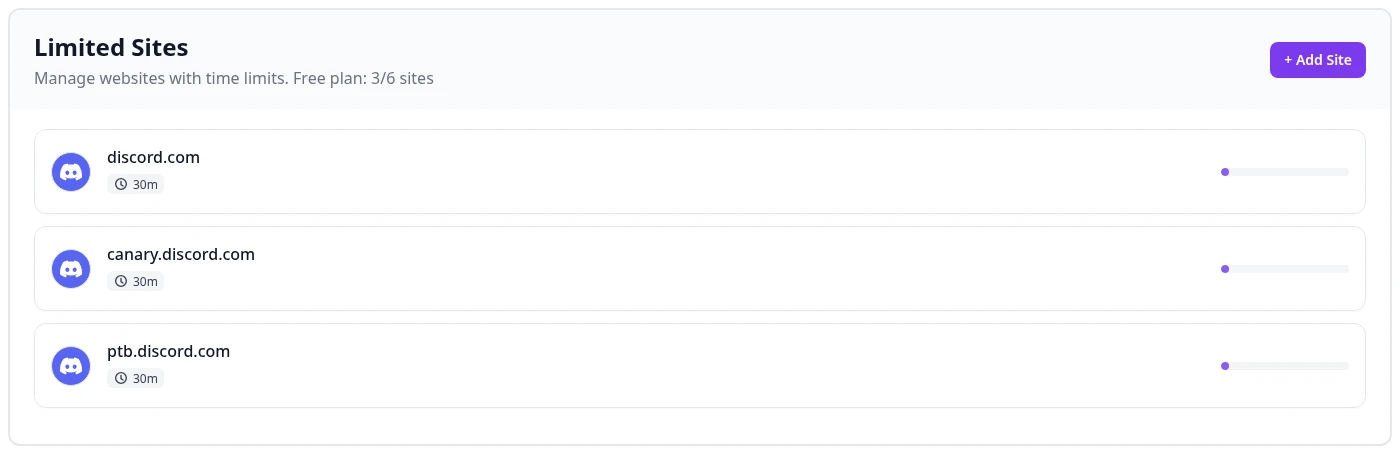
canary.discord.com and ptb.discord.com stay up. They do not redirect to discord.com. If you use Canary or the public test build in Chrome, add the hostname the popup shows. Each one has its own clock and uses one of the six free hostnames. The stable app does not need those rows.
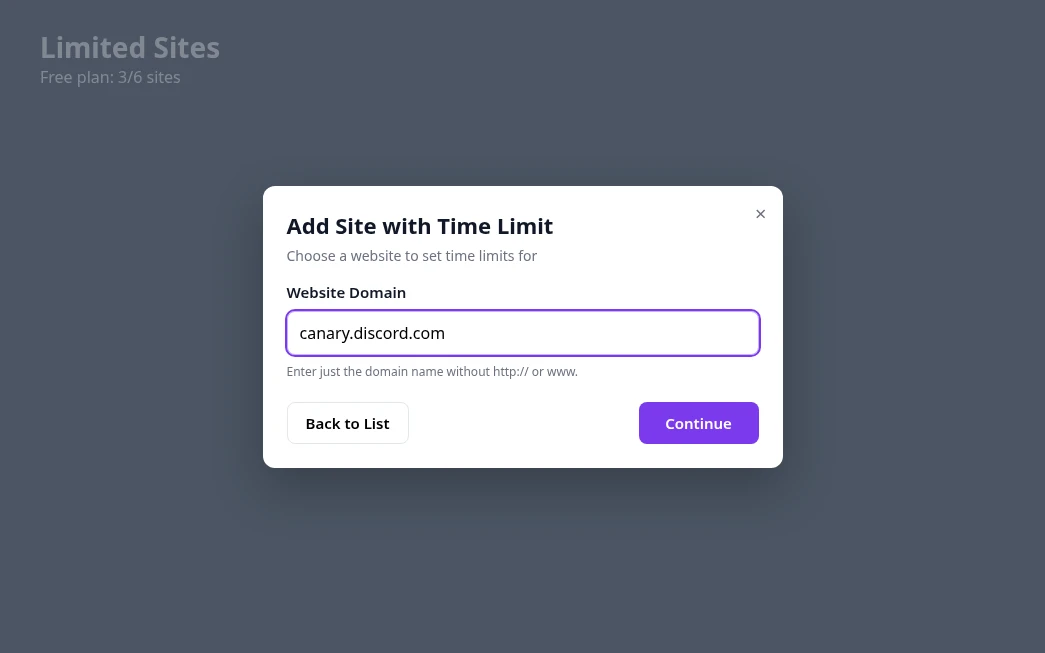
Servers, DMs, and voice share one clock
You cannot limit one server and leave another open. A server channel, DMs under /channels/@me, and voice or video in the web app are the same hostname. Path Analysis, free on up to 3 hosts, can show that split. The free tree is 2 levels deep, or 10 on Pro. It only tracks.
Counting pauses after 15 seconds without keyboard or mouse input, or when the screen locks, even if a call keeps going. Scrolling and clicking count as input. A widget embedded on another site is an iframe. SiteKeeper neither blocks nor counts it.
The Discord desktop app is not Chrome
The desktop app is Electron, not a Chrome tab. SiteKeeper does not run inside it, so a limit on discord.com does not cap or hang up a call in that app. Quitting the website does not quit the app. Use the hosts file or DNS below if the app on this computer should fail to connect, and remember a phone on mobile data is still outside both.
Reports list each Discord host alone
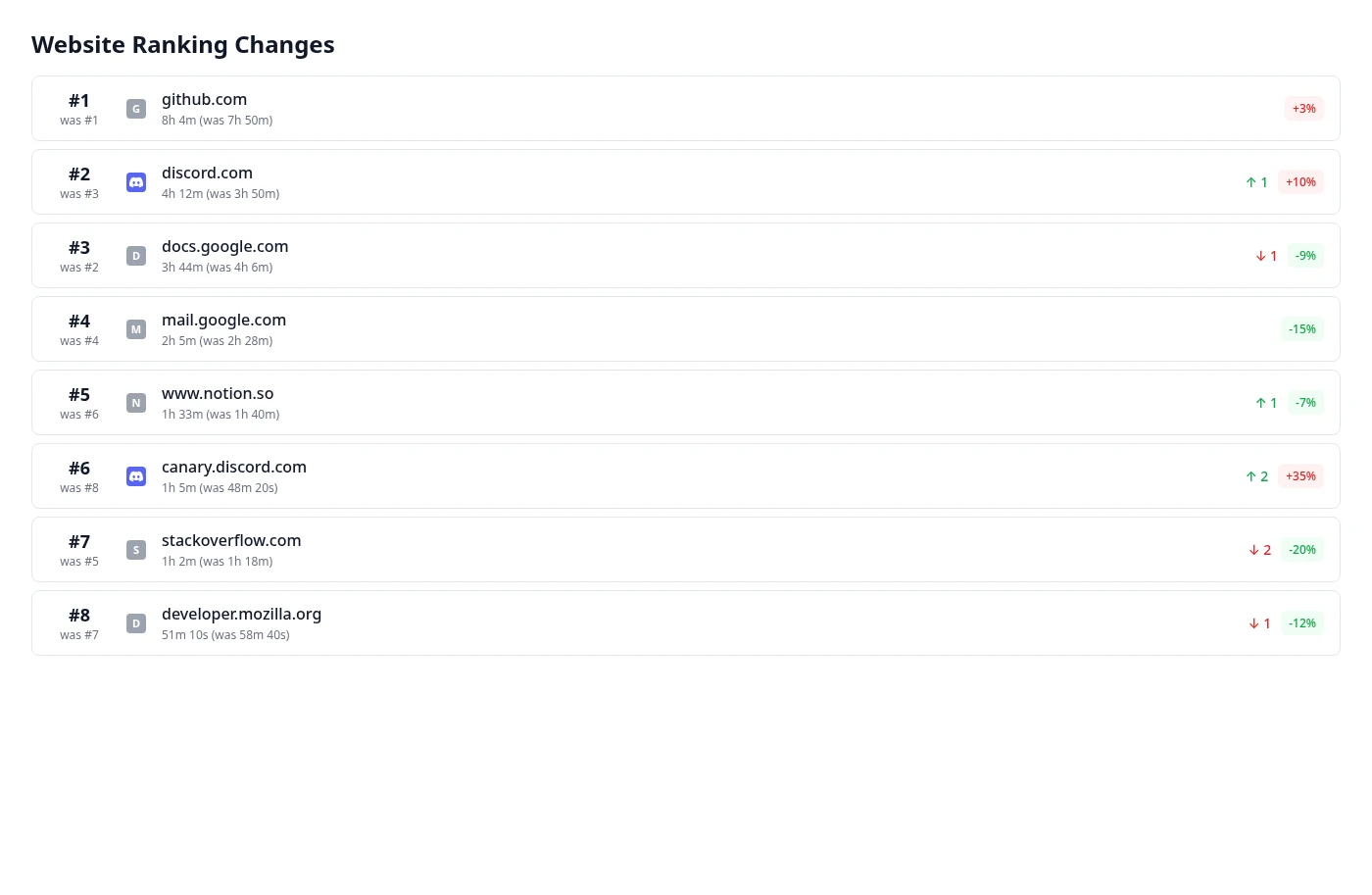
Limited Sites and the weekly ranking list discord.com, canary.discord.com, and ptb.discord.com as separate rows. Minutes on Canary do not fill the stable app.
Incognito and other browsers
Incognito is not officially supported. Chrome turns extensions off there unless you enable Allow in Incognito at chrome://extensions, under SiteKeeper, then Details, and we do not promise that mode. Close it with IncognitoModeAvailability set to 1, or with Family Link. Other browsers are outside this extension, and limits do not sync.
Block Discord without an extension
None of these four is a Discord minute budget in ordinary Chrome. Use one when the block page must not be able to undo the block.
Family Link on a supervised account
In the Family Link app, open the child, then Controls, then Google Chrome and Web, then Manage sites, then Blocked sites. Add the domain discord to cover discord.com, www, Canary, and PTB. Also add discord.gg and discordapp.com. Those names are not subdomains of discord.com.
Android and Chromebook are fully supervised. On Windows, Mac, and Linux it applies only while the child is signed into that Chrome profile, and they can sign out or use another browser. Family Link blocks Chrome. It does not close the desktop app.
Chrome URLBlocklist policy
URLBlocklist works on a personal computer and needs an administrator. It blocks URLs, with no time limit. discord.com matches its subdomains, including www, canary, and ptb. Also list discord.gg and discordapp.com. A path exception still will not keep one server open, because chat moves across channel paths.
On Windows, add string values under HKEY_LOCAL_MACHINE\SOFTWARE\Policies\Google\Chrome\URLBlocklist. Name 1 is discord.com. Name 2 is discord.gg. Name 3 is discordapp.com. On macOS, deliver the same policy with a configuration profile for com.google.Chrome. On Linux, put a JSON file in /etc/opt/chrome/policies/managed/:
{
  "URLBlocklist": ["discord.com", "discord.gg", "discordapp.com"]
}
Open chrome://policy and reload. Chrome then shows it is managed by your organization. Set IncognitoModeAvailability to 1 if Incognito should be off. The block is Chrome-only.
Hosts file on this computer
The hosts file stops these names for every program that uses system DNS, which can include the desktop app as well as every browser. It has no schedule and no wildcards, so each name needs a line. discord.com does not cover canary.discord.com. On Windows, edit C:\Windows\System32\drivers\etc\hosts in Notepad opened as administrator. On macOS and Linux, edit /etc/hosts with sudo.
0.0.0.0 discord.com
0.0.0.0 www.discord.com
0.0.0.0 discordapp.com
0.0.0.0 discord.gg
0.0.0.0 canary.discord.com
0.0.0.0 ptb.discord.com
Flush DNS afterward. On Windows run ipconfig /flushdns. On macOS run sudo dscacheutil -flushcache and sudo killall -HUP mDNSResponder. Clear Chrome at chrome://net-internals/#dns and restart it. A VPN or a proxy can bypass the file.
Router or DNS filtering
Block Discord in the router's parental controls or with filtering DNS. Every device on that Wi-Fi is covered, including the phone app and the desktop app, and some routers can schedule it. Mobile data is not. Chrome's Use secure DNS setting (Settings, Privacy and security, Security) or a VPN can bypass it. Point secure DNS at the same provider, or turn it off.
Compare ways to block or limit Discord
SiteKeeper is the easiest method to undo. That suits your own profile and fails as a lock.
SiteKeeper
- Cost
- Free for 6 hostnames. Pro drops the cap ($4.99/mo, $24.99/yr, $29.99 lifetime).
- Daily time limits
- Yes, per hostname. 0 minutes blocks that host.
- Covers Incognito
- No. Not officially supported.
- Covers other browsers and devices
- This Chrome only. Not the desktop app.
- How easy to undo
- Easiest. Add time, turn it off, or disable it. No password.
- Best for
- A daily Discord cap you can undo yourself.
Family Link
- Cost
- Free.
- Daily time limits
- No Chrome timer. It blocks.
- Covers Incognito
- Can close private windows on a supervised account.
- Covers other browsers and devices
- Full on Android and Chromebook. Desktop: that Chrome sign-in only.
- How easy to undo
- A parent changes it. A child on a computer can switch profiles.
- Best for
- A supervised child.
Chrome URLBlocklist
- Cost
- Free. Needs an admin account.
- Daily time limits
- No. Blocked entirely.
- Covers Incognito
- Only with IncognitoModeAvailability set to 1.
- Covers other browsers and devices
- That Chrome install. Subdomains of discord.com included.
- How easy to undo
- An admin removes the policy.
- Best for
- A hard block in Chrome.
Hosts file
- Cost
- Free. Needs an admin account.
- Daily time limits
- No.
- Covers Incognito
- Yes, unless a VPN or proxy bypasses it.
- Covers other browsers and devices
- Programs on this computer that use system DNS.
- How easy to undo
- Edit the file as admin and flush DNS.
- Best for
- Chrome and the desktop app on one PC.
Router or DNS filtering
- Cost
- Often free on the router.
- Daily time limits
- No timer. Some routers can schedule it.
- Covers Incognito
- Yes, unless secure DNS or a VPN bypasses it.
- Covers other browsers and devices
- Every device on that Wi-Fi, including the app. Not mobile data.
- How easy to undo
- Change the router, or leave the network.
- Best for
- The whole home network.
When to block Discord and when to limit it
Use 0 hours and 0 minutes when the website should not open. Use 30 minutes when you still want a check-in. Servers, DMs, and web voice stay on the discord.com clock. Leave Canary and PTB off the list if you do not use them.
A 0-minute window, Monday to Friday 9:00 AM to 5:00 PM, blocks those hours in Chrome, and the daily limit still applies in the evening. The desktop app ignores both. If you will raise the limit from Time's Up, use Family Link, URLBlocklist, the hosts file, or DNS instead.
Troubleshooting
If Discord still opens in Chrome, read the hostname in the popup, then check Canary, the desktop app, and Incognito.
Discord still opens after you set a limit
Cause: The row is www.discord.com or discord.gg, the tab is on Canary or PTB, or Limit Web Time is off.
Fix: Save the hostname the popup shows. For the stable web app that is discord.com.
Discord flashes, then the block page appears
Cause: The first visit with a 0-minute limit can load for about a second.
Fix: Later visits should open Time's Up immediately.
One server is capped and another still opens
Cause: Servers are paths on discord.com. There is no per-server limit.
Fix: The discord.com limit covers every server and DM. Path Analysis only shows the split.
Canary or PTB still opens
Cause: Those hosts do not redirect to discord.com, so they are not covered by that row.
Fix: Add canary.discord.com or ptb.discord.com only if you use that build. Each one uses a free slot.
The desktop app keeps working
Cause: The desktop app is not Chrome. SiteKeeper does not run there.
Fix: Use the hosts file or router DNS if that app should stop connecting. A phone on mobile data can still open Discord.
A call keeps going after the count looks low
Cause: Counting pauses after 15 seconds without keyboard or mouse input, even while web voice continues.
Fix: Use a 0-minute daily limit or a 0-minute window when the tab itself should stop.
It works in a normal window, not in Incognito
Cause: The extension is desktop Chrome only, and it is off in Incognito by default.
Fix: Close Incognito with policy or Family Link. Use hosts or DNS for other browsers.
Frequently asked questions
Can Chrome block Discord without an extension?
Family Link, URLBlocklist, the hosts file, and router DNS can block it. None of them is a 30-minute timer in ordinary Chrome.
Does a limit on discord.com cover servers, DMs, voice, and invite links?
Servers, DMs, and voice in the web app share discord.com. discord.gg invites redirect there. canary.discord.com and ptb.discord.com do not. The desktop app is not Chrome.
Why does a limit saved as discord.gg or www.discord.com do nothing?
Both redirect to discord.com, so those rows never match. Type discord.com, or save the hostname the popup shows.
Will SiteKeeper block Discord in the desktop app or Incognito?
No. The desktop app is Electron, and Incognito is not officially supported. Set IncognitoModeAvailability to 1, or use Family Link, to close Incognito. Use hosts or DNS for the desktop app.
What does Add Time & Unblock actually change?
It raises the saved limit for good. Adding 15 minutes to a 30-minute cap makes it 45 until you set it back.
Can I limit one server and leave another open?
Not with SiteKeeper. Every server is a path on discord.com. Path Analysis can show the split. It does not block a path.
Can I block Discord during work and allow it in the evening?
Yes, in Chrome. A 0-minute weekday window blocks those hours, and the daily limit still applies afterward. A window with no limit does not block by itself. The desktop app is not included.
Will this stop a child from opening Discord?
No. There is no password, and Add Time raises the limit. The desktop app and a phone on mobile data are outside this extension.
Set a Discord limit in Chrome
Add discord.com, turn on Limit Web Time, and set 30 minutes or 0 minutes. Daily limits, weekly limits, and time windows are covered on website time limits. Install SiteKeeper from the Chrome Web Store.
Other guides
Block or limit YouTube on Chrome with a 30-minute daily cap or a 0-minute block in SiteKeeper, plus Family Link, URLBlocklist, the hosts file, and DNS.
Block or limit Reddit on Chrome with a 30-minute daily cap or a 0-minute block in SiteKeeper, plus old.reddit.com, Family Link, URLBlocklist, hosts, and DNS.
Block or limit TikTok on Chrome with a 10-minute daily cap or a 0-minute block in SiteKeeper, plus Family Link, URLBlocklist, the hosts file, and DNS.
Limit or block www.instagram.com on Chrome with a 30-minute cap or a 0-minute block. Reels and DMs share it. Family Link, URLBlocklist, hosts, and DNS.
Block or limit X on Chrome with a 30-minute daily cap or a 0-minute block in SiteKeeper, plus Family Link, URLBlocklist, the hosts file, and DNS.
Set a 30-minute Facebook limit on Chrome, or block www.facebook.com with SiteKeeper. Also covers Family Link, URLBlocklist, the hosts file, and DNS.
Set a 60-minute Netflix cap on Chrome, or block www.netflix.com in SiteKeeper. Also covers Family Link, URLBlocklist, the hosts file, and DNS.
Set a 30-minute Twitch limit on Chrome, or block www.twitch.tv with SiteKeeper. Also covers clips, Family Link, URLBlocklist, the hosts file, and DNS.
Set a 30-minute LinkedIn limit on Chrome, or block www.linkedin.com with SiteKeeper. Also covers Family Link, URLBlocklist, the hosts file, and DNS.